Monday, 18 November 2013

Seperate thread for UI updation in Android

Where to use:
 Already one thread is running in our application ,In the same thread You want to update UI thread ,following code will help You.

"Calling the child thread  if parent thread functionality  changing every time."


Sample code:
---------------------------

//Parent thread
@Override
                public void onMessage(final String message) {

//child thread
runOnUiThread(new Runnable() {
                        @Override
                        public void run() {
                    // UI Updations
                           
                            t.append("\n"+message);
                        }
                    });

}

Sunday, 10 November 2013

Class has two properties of the same name , At the time of Java Bean to xml conversion


Name Of the Error:

Class has two properties of the same name "fieldName"
this problem is related to the following location:

--------------


Solution:
------------------------------

@XmlRootElement(name="yourRootElementName") @XmlAccessorType(XmlAccessType.FIELD)


Hint:
At the time of binding java bean to xml ,jaxb impl always look the getters methods .so if you are
used the above annotation then binding will takes by fields(all fields)


The use of access type FIELD will cause JAXB implementations to create bindings for:
  1.  fields
  2.  annotated properties

Sunday, 20 May 2012

Java Just In Time compiler-JIT compiler

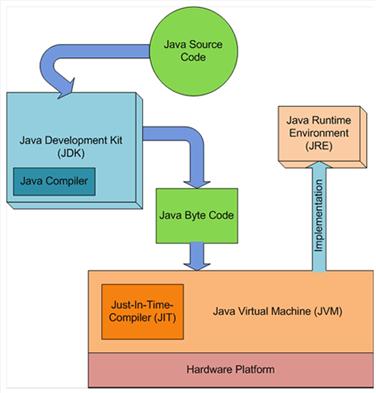
In Java you have to write and compile a program only once. The Java on any platform will interpret the compiled bytecode into instructions understandable by the particular processor. However java virtual machine handles only one bytecode instruction at a time that makes execution slow. But Using the Java just-in-time compiler at the particular system platform compiles the bytecode into the particular system code. After the code has been (re-)compiled by the JIT compiler, it will usually run more quickly on the computer.
The just-in-time compiler comes with JVM and is used optionally. It compiles the bytecode into platform-specific executable code that is immediately executed. JIT compiler option should be used especially if the method executable is repeatedly reused in the code.

Wednesday, 9 May 2012

core skills needed by all software developers are:


The core skills needed by all software developers are:


Core Skill
Description
Read Code

The ability to understand an existing code base in order to analyze its behavior and make fixes or enhancements to it.
Write Code

This does not include any significant amount of design – just the basics of coding. An example is being able to write a method given the desired behavior (inputs, outputs, pre-conditions and post-conditions).

Design Software
The ability to determine what code is necessary to achieve some specified functionality, particularly the higher-level structure or organization of the code.

Awareness of the Software Development Life Cycle
This is an awareness of the 'big picture' of software development beyond just writing code - how the other life cycle stages (requirements, design, testing, and maintenance) impact coding and vice-versa. This includes an understanding of the types of methodologies (e.g. Agile or Waterfall) that can be used to progress through this cycle.

Use of Libraries and Frameworks
This skill could also be called "Reuse Existing Code". This skill includes the ability to search for and evaluate libraries and frameworks based on how effectively they meet your needs and the ability to integrate the chosen package into the software you are writing.

Debugging
The ability to analyze the behavior of code to diagnose a problem and find the underlying cause. This includes but is not limited to using a debugger.

Use of Integrated Development Environments

The ability to effectively use modern IDEs and an understanding of their strengths and weaknesses.


Use of Version Control
This skill includes basic use of a version control tool as well as a general understanding of software configuration management.

Automated Unit Testing
This is the ability to unit test code by writing automated tests.


Refactoring
The ability to revise existing code without impacting its functional behavior.

Use of Build Automation
This goes beyond simply writing a build script to include other related automation like continuous integration, automated deployments, and static code analysis tools.

Friday, 20 April 2012

How many ways we can set java class path


How to set Java classpath? List as many ways as you can. This can be an interesting Java job interview question. Here are what I came up with:

  1. Use -classpath JVM option:
    java -classpath C:\hello\build\classes com.javahowto.test.HelloWorld
  2. Use -cp JVM option, a short form of -classpath:
    java -cp C:\hello\build\classes com.javahowto.test.HelloWorld
  3. Use -Djava.class.path system property:
    java -Djava.class.path=C:\hello\build\classes com.javahowto.test.HelloWorld
  4. Use CLASSPATH environment variable:
    set CLASSPATH=C:\hello\build\classes;
    java com.javahowto.test.HelloWorld
  5. Use current directory as the default classpath:
    cd C:\hello\build\classes;
    java com.javahowto.test.HelloWorld
  6. Package all classes into a self-containing jar file that has this in its META-INF/MANIFEST.MF.
    Main-Class: com.javahowto.test.HelloWorld
    java -jar hello-world.jar
    Note: when you run java with -jar option, any -classpath, or -cp options are ignored, as JVM thinks all classes are already contained inside the jar file.
Among all those options, I usually use option 1, and occasionally 6. I don't like my Java apps have dependency on environment settings like CLASSPATH, which is totally unpredictable. Using current directory as the default classpath is not a good idea either, since your classes may be scattered in several directories, folders and jar files.

Can I set classpath at java runtime dynamically and programmatically? No. Although you can set the system property java.class.path in your application, but its new value doesn't affect the system classloader. If you need to reset classpath, it's time to consider using a custom classloader as the child loader of the system classloader.

With a custom classloader, you have full control where to load class files, from local file system, remote url, or even database. Classes loaded by such a custom loader are only visible by this loader and its child loaders, but not to its parent loader nor the system classloader.

For the same reason, you can't dynamically set minimum/maximum heap size of a JVM. These JVM options are all set once when JVM is started and unchanged throughout its life.

JDK 6 now support * in classpath, so you can include all jar files in a directory to the classpath easily. But you may run into problems described in http://javahowto.blogspot.com/2006/07/jdk-6-supports-in-classpath-but-be.html