Wednesday, 26 March 2014

Java Database connection failed to connect Derby Database :access denied java.net.SocketPermission :


Java Database connection failed to connect Derby Database :access denied    java.net.SocketPermission :
 
Problem:

Tue Feb 11 11:49:08 EST 2014 : Security manager installed using the Basic server security policy. Tue Feb 11 11:49:09 EST 2014 : access denied ("java.net.SocketPermission" "localhost:1527" "listen,resolve") java.security.AccessControlException: access denied ("java.net.SocketPermission" "localhost:1527" "list372en,resolve") at java.security.AccessControlContext.checkPermission(AccessControlContext.java:

    Very rare cases we can get this type of exceptions . After 2 to 3 hrs of exploration and googling i found a very simple solution.you no need to waste your valuable time. Just you can go through the below single step that more than sufficent to resolve the above problem.


Solution:
1 . Find the java.policy file in your jdk platform
2. which is located in JAVA_HOME\jre\lib\security\java.policy
3. For editing this file You may need administrator privileges.
4. Add this line into the grant block in java.policy file and save it
 grant
 {
      permission java.net.SocketPermission "localhost:1527", "listen,resolve";
 }


Now your problem is resolved .... :)

Tuesday, 19 November 2013

How to create application shortcuts in desktop (Ubuntu)

How to create application shortcuts in  desktop (Ubuntu)
-------------------------------------------------------
It is very simple ,using one command we can complete this task

gnome-desktop-item-edit --create-new ~/Desktop
 
If above command is not found first you need to install the 
 sudo apt-get install  gnome-panel 
 
Then It will shows the following GUI
 
enter image description here 

  • You can give the any name , command location and comment 
  • Click on the image if you want to change it


Monday, 18 November 2013

Seperate thread for UI updation in Android

Where to use:
 Already one thread is running in our application ,In the same thread You want to update UI thread ,following code will help You.

"Calling the child thread  if parent thread functionality  changing every time."


Sample code:
---------------------------

//Parent thread
@Override
                public void onMessage(final String message) {

//child thread
runOnUiThread(new Runnable() {
                        @Override
                        public void run() {
                    // UI Updations
                           
                            t.append("\n"+message);
                        }
                    });

}

Sunday, 10 November 2013

Class has two properties of the same name , At the time of Java Bean to xml conversion


Name Of the Error:

Class has two properties of the same name "fieldName"
this problem is related to the following location:

--------------


Solution:
------------------------------

@XmlRootElement(name="yourRootElementName") @XmlAccessorType(XmlAccessType.FIELD)


Hint:
At the time of binding java bean to xml ,jaxb impl always look the getters methods .so if you are
used the above annotation then binding will takes by fields(all fields)


The use of access type FIELD will cause JAXB implementations to create bindings for:
  1.  fields
  2.  annotated properties

Sunday, 20 May 2012

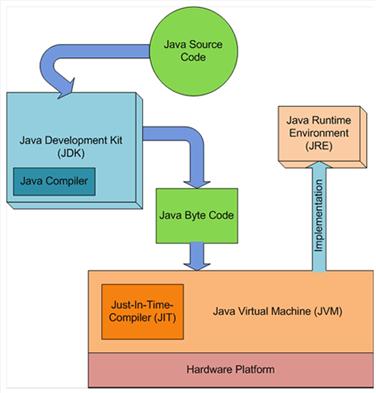
Java Just In Time compiler-JIT compiler

In Java you have to write and compile a program only once. The Java on any platform will interpret the compiled bytecode into instructions understandable by the particular processor. However java virtual machine handles only one bytecode instruction at a time that makes execution slow. But Using the Java just-in-time compiler at the particular system platform compiles the bytecode into the particular system code. After the code has been (re-)compiled by the JIT compiler, it will usually run more quickly on the computer.
The just-in-time compiler comes with JVM and is used optionally. It compiles the bytecode into platform-specific executable code that is immediately executed. JIT compiler option should be used especially if the method executable is repeatedly reused in the code.

Wednesday, 9 May 2012

core skills needed by all software developers are:


The core skills needed by all software developers are:


Core Skill
Description
Read Code

The ability to understand an existing code base in order to analyze its behavior and make fixes or enhancements to it.
Write Code

This does not include any significant amount of design – just the basics of coding. An example is being able to write a method given the desired behavior (inputs, outputs, pre-conditions and post-conditions).

Design Software
The ability to determine what code is necessary to achieve some specified functionality, particularly the higher-level structure or organization of the code.

Awareness of the Software Development Life Cycle
This is an awareness of the 'big picture' of software development beyond just writing code - how the other life cycle stages (requirements, design, testing, and maintenance) impact coding and vice-versa. This includes an understanding of the types of methodologies (e.g. Agile or Waterfall) that can be used to progress through this cycle.

Use of Libraries and Frameworks
This skill could also be called "Reuse Existing Code". This skill includes the ability to search for and evaluate libraries and frameworks based on how effectively they meet your needs and the ability to integrate the chosen package into the software you are writing.

Debugging
The ability to analyze the behavior of code to diagnose a problem and find the underlying cause. This includes but is not limited to using a debugger.

Use of Integrated Development Environments

The ability to effectively use modern IDEs and an understanding of their strengths and weaknesses.


Use of Version Control
This skill includes basic use of a version control tool as well as a general understanding of software configuration management.

Automated Unit Testing
This is the ability to unit test code by writing automated tests.


Refactoring
The ability to revise existing code without impacting its functional behavior.

Use of Build Automation
This goes beyond simply writing a build script to include other related automation like continuous integration, automated deployments, and static code analysis tools.

Friday, 20 April 2012

How many ways we can set java class path


How to set Java classpath? List as many ways as you can. This can be an interesting Java job interview question. Here are what I came up with:

  1. Use -classpath JVM option:
    java -classpath C:\hello\build\classes com.javahowto.test.HelloWorld
  2. Use -cp JVM option, a short form of -classpath:
    java -cp C:\hello\build\classes com.javahowto.test.HelloWorld
  3. Use -Djava.class.path system property:
    java -Djava.class.path=C:\hello\build\classes com.javahowto.test.HelloWorld
  4. Use CLASSPATH environment variable:
    set CLASSPATH=C:\hello\build\classes;
    java com.javahowto.test.HelloWorld
  5. Use current directory as the default classpath:
    cd C:\hello\build\classes;
    java com.javahowto.test.HelloWorld
  6. Package all classes into a self-containing jar file that has this in its META-INF/MANIFEST.MF.
    Main-Class: com.javahowto.test.HelloWorld
    java -jar hello-world.jar
    Note: when you run java with -jar option, any -classpath, or -cp options are ignored, as JVM thinks all classes are already contained inside the jar file.
Among all those options, I usually use option 1, and occasionally 6. I don't like my Java apps have dependency on environment settings like CLASSPATH, which is totally unpredictable. Using current directory as the default classpath is not a good idea either, since your classes may be scattered in several directories, folders and jar files.

Can I set classpath at java runtime dynamically and programmatically? No. Although you can set the system property java.class.path in your application, but its new value doesn't affect the system classloader. If you need to reset classpath, it's time to consider using a custom classloader as the child loader of the system classloader.

With a custom classloader, you have full control where to load class files, from local file system, remote url, or even database. Classes loaded by such a custom loader are only visible by this loader and its child loaders, but not to its parent loader nor the system classloader.

For the same reason, you can't dynamically set minimum/maximum heap size of a JVM. These JVM options are all set once when JVM is started and unchanged throughout its life.

JDK 6 now support * in classpath, so you can include all jar files in a directory to the classpath easily. But you may run into problems described in http://javahowto.blogspot.com/2006/07/jdk-6-supports-in-classpath-but-be.html

Monday, 5 March 2012

While using Glassfish v3.1 with JSF 2.0 I ended up getting this very annoying warning. WARNING: PWC4011: Unable to set request character encoding to UTF-8 from context /, because request parameters have already been read, or ServletRequest.getReader() has already been called

This seems to be very common with a very hard to find solution on google.
Finnally after a lot of search I found this link which had the solution.


Place the following in the glassfish-web.xml of the web application.

<parameter-encoding default-charset="UTF-8"/>


<!DOCTYPE glassfish-web-app PUBLIC "-//GlassFish.org//DTD GlassFish Application Server 3.1 
Servlet 3.0//EN" "http://glassfish.org/dtds/glassfish-web-app_3_0-1.dtd">
 
 <glassfish-web-app error-url="">
 <parameter-encoding default-charset="UTF-8"/>
...
</glassfish-web-app>

Wednesday, 22 February 2012

Getting values From the url in jsf

1. activation.xhtml


Your account is successfully activated!
You will in 3 seconds be redirected to home page


Activation failed! Please enter your email address to try once again.

...


Backing Bean:


/*
* To change this template, choose Tools | Templates
* and open the template in the editor.
*/
package com.example;

import java.util.Map;
import javax.annotation.PostConstruct;
import javax.faces.bean.ManagedBean;
import javax.faces.bean.ManagedProperty;
import javax.faces.bean.RequestScoped;
import javax.faces.context.FacesContext;

/**
*
* @author Pujya Sri
*/
@ManagedBean
@RequestScoped
public class Activation {
private boolean valid;

public boolean isValid() {
return valid;
}

public void setValid(boolean valid) {
this.valid = valid;
}

@PostConstruct
public void init() {
Map requestMap = FacesContext.getCurrentInstance().getExternalContext().getRequestParameterMap();
String key = (String) requestMap.get("key");
System.out.println("hello from url" + key);

// Get User based on activation key.
// Delete activation key from database.
// Login user.
}
// ...
}


Thursday, 19 January 2012

counting the number of times a user has visited a page in HTML 5


<script type="text/javascript">
if (localStorage.pagecount)
{
localStorage.pagecount=Number(localStorage.pagecount) +1;
}
else
{
localStorage.pagecount=1;
}
document.write("Visits "+ localStorage.pagecount + " time(s).");
</script>

Wednesday, 21 December 2011

Creating our own Captcha in Java server faces


step 1:Create a servlet

//This can be located at a package called servlets(next to entities and managed beans)
public
class MyCaptcha extends HttpServlet{

      private int height = 0;

    private int width = 0;

    public static final String CAPTCHA_KEY = "captcha_key_name";


   @Override

    public void init(ServletConfig config) throws ServletException {

        super.init(config);

        height = Integer.parseInt(getServletConfig().getInitParameter("height"));
        width = Integer.parseInt(getServletConfig().getInitParameter("width"));
    }

    @Override
    protected void doGet(HttpServletRequest req, HttpServletResponse response) throws IOException, ServletException {
        //Expire response
        response.setHeader("Cache-Control", "no-cache");
        response.setDateHeader("Expires", 0);
        response.setHeader("Pragma", "no-cache");
        response.setDateHeader("Max-Age", 0);

        BufferedImage image = new BufferedImage(width, height, BufferedImage.TYPE_INT_RGB);
        Graphics2D graphics2D = image.createGraphics();
        Hashtable<TextAttribute, Object> map = new Hashtable<TextAttribute, Object>();
        Random r = new Random();
        String token = Long.toString(Math.abs(r.nextLong()), 36);
        String ch = token.substring(0, 6);
        Color c = new Color(0.6662f, 0.4569f, 0.3232f);
       GradientPaint gp = new GradientPaint(30, 30, c, 15, 25, Color.white, true);
        graphics2D.setPaint(gp);
        Font font = new Font("Verdana", Font.CENTER_BASELINE, 26);
        graphics2D.setFont(font);
        graphics2D.drawString(ch, 2, 20);
        graphics2D.dispose();

        HttpSession session = req.getSession(true);
        session.setAttribute(CAPTCHA_KEY, ch);

        OutputStream outputStream = response.getOutputStream();
            ImageIO.write(image, "jpeg", outputStream);
        outputStream.close();
    }

}

Step 2: configuring web.xml

<servlet>

            <servlet-name>Captcha</servlet-name>
            <servlet-class>servlets.MyCaptcha</servlet-class>
            <init-param>
                  <description>passing height</description>
                  <param-name>height</param-name>
                  <param-value>30</param-value>
            </init-param>
            <init-param>
                  <description>passing height</description>
                  <param-name>width</param-name>
                  <param-value>120</param-value>
            </init-param>
      </servlet>
      <servlet-mapping>
            <servlet-name>Captcha</servlet-name>
            <url-pattern>/Captcha.jpg</url-pattern>
      </servlet-mapping>

step 3;Add the captcha markup at the front page
<h:graphicImage id="capimg"
                                    value="#{facesContext.externalContext.requestContextPath}/../Captcha.jpg" />
                              <br />
                              <h:outputText value="*Napisite text koj vidite u slici " />
                              <h:inputText id="captchaSellerInput"
                                    value="#{registrationControllerSeller.captchaSellerInput}" />


Step 4:Add the backing bean logic of the captha:

HttpServletRequest request = (HttpServletRequest) FacesContext
            .getCurrentInstance().getExternalContext().getRequest();
            Boolean isResponseCorrect = Boolean.FALSE;
            javax.servlet.http.HttpSession session = request.getSession();
            String parm = captchaSellerInput;
            String c = (String) session.getAttribute(MyCaptcha.CAPTCHA_KEY);
            if (parm.equals(c)) {
                 //CAPTCHA CORRECT INPUT
            }
           
else {
                //CAPTCHA INCORRECT INPUT  
            }

Tuesday, 20 December 2011

JSF with AJAX Example for handling selectOneMenu


The index.xhtml will contains following tags to display two dropdown list and to link then using Ajax.

<?xml version='1.0' encoding='UTF-8' ?>

<!DOCTYPE html PUBLIC "-//W3C//DTD XHTML 1.0 Transitional//EN" "http://www.w3.org/TR/xhtml1/DTD/xhtml1-transitional.dtd">

<!-- index.xhtml -->
<html xmlns="http://www.w3.org/1999/xhtml"

xmlns:h="http://java.sun.com/jsf/html
xmlns:f="http://java.sun.com/jsf/core">
 <h:head>

<title>JSF AJAX</title>

</h:head>

<h:body>

<h3>Select Mobile</h3>  <h:form>

Company : <h:selectOneMenu value="#{jsfBean.company_name}">

<f:selectItems value="#{jsfBean.company}"/>

<f:ajax event="change" render="model" listener="#{jsfBean.setModel}" />

</h:selectOneMenu><br></br><br></br>

Model :

<h:selectOneMenu value="#{jsfBean.model_no}" id="model" style="width: 120px;">

<f:selectItems value="#{jsfBean.model}"/>

</h:selectOneMenu>

</h:form>

</h:body>


</html>
This application can be more effective if the given application can be implemented with database, where the dropdown lists will be loaded from database records.
Outputs :

/*

* To change this template, choose Tools | Templates

* and open the template in the editor.

*/package beans; import javax.faces.bean.ManagedBean;
import javax.faces.bean.RequestScoped;
import javax.faces.event.AjaxBehaviorEvent;
import javax.faces.model.SelectItem;
/**
*
* @author Prashant
*/
@ManagedBean
@RequestScoped
public class JsfBean {
/** Creates a new instance of JsfBean */
private SelectItem[] company=new SelectItem[]{
new SelectItem(“nokia”, “Nokia”),
new SelectItem(“samsung”, “Samsung”),
new SelectItem(“sony ericson”, “Sony Ericsson”),
new SelectItem(“black berry”, “Black Berry”)
};
private SelectItem[] nokia=new SelectItem[]{
new SelectItem(“8800 Carbon”,”8800 Carbon”),
new SelectItem(“E90 Communicator”, “E90 Communicator”),
new SelectItem(“N97″, “N97″),
new SelectItem(“N96″, “N96″),
new SelectItem(“N95″, “N95″),
new SelectItem(“6260 Slide”, “6260 Slide”),
new SelectItem(“5800 Express music”, “5800 Express music”),
new SelectItem(“N73 Music Edition”, “N73 Music Edition”)
};
private SelectItem[] samsung=new SelectItem[]{
new SelectItem(“OMNIA i900″,”OMNIA i900″),
new SelectItem(“S8330 Ultra TOUCH”, “S8330 Ultra TOUCH”),
new SelectItem(“M8800 Pixon”, “M8800 Pixon”),
new SelectItem(“Jet S8003″, “Jet S8003″),
new SelectItem(“Jet U900 Soul”, “U900 Soul”),
new SelectItem(“DJ M7603″, “DJ M7603″),
new SelectItem(“U800 Soul B”, “U800 Soul B”),
new SelectItem(“Beat M3510″, “Beat M3510″),
new SelectItem(“D780″, “D780″),
new SelectItem(“E251″, “E251″),
};
private SelectItem[] sony=new SelectItem[]{
new SelectItem(“Xperia X1″,”Xperia X1″),
new SelectItem(“C905″, “C905″),
new SelectItem(“W995″, “W995″),
new SelectItem(“W980i”, “W980i”),
new SelectItem(“K850i”, “K850i”),
new SelectItem(“C902″, “C902″),
new SelectItem(“W705″, “W705″)
};
private SelectItem[] blackberry=new SelectItem[]{
new SelectItem(“Bold 9000″,”Bold 9000″),
new SelectItem(“8820″, “8820″),
new SelectItem(“8830″, “8830″),
new SelectItem(“8800″, “8800″),
new SelectItem(“Curve 8900″, “Curve 8900″),
new SelectItem(“Curve 8310″, “Curve 8310″),
new SelectItem(“Pearl 8110″, “Pearl 8110″),
new SelectItem(“Pearl Flip 8220″, “Pearl Flip 8220″)
};
private SelectItem model[]=nokia;
private String company_name=”company_name”;
private String model_no;
public JsfBean() {
}
public SelectItem[] getCompany() {
return company;
}
public void setCompany(SelectItem[] company) {
this.company = company;
}
public String getCompany_name() {
return company_name;
}
public void setCompany_name(String company_name) {
this.company_name = company_name;
}
public String getModel_no() {
return model_no;
}
public void setModel_no(String model_no) {
this.model_no = model_no;
}
public SelectItem[] getNokia() {
return nokia;
}
public void setNokia(SelectItem[] nokia) {
this.nokia = nokia;
}
public SelectItem[] getSamsung() {
return samsung;
}
public void setSamsung(SelectItem[] samsung) {
this.samsung = samsung;
}
public SelectItem[] getModel() {
//
// this.model = nokia;
return model;
}
public void setModel(AjaxBehaviorEvent evt) {
if(company_name.equalsIgnoreCase(“nokia”))
this.model =nokia;
else if(company_name.equalsIgnoreCase(“samsung”))
this.model =samsung;
else if(company_name.equalsIgnoreCase(“sony ericson”))
this.model =sony;
else if(company_name.equalsIgnoreCase(“black berry”))
this.model =blackberry;
}
}




JSF with AJAX Example using slectonemenuItem


//following managed bean and xhtml file will give the some idea


com.example.Item
public class Item {

    private String value1;
    private String value2;

    // Generate public getters/setters.  
}
com.example.Bean
@ManagedBean
@ViewScoped
public class Bean {

    private List<Item> items;
    private DataModel<Item> model;
    private List<String> list;

    @PostConstruct
    public void init() {
        items = Arrays.asList(new Item(), new Item(), new Item());
        model = new ListDataModel<Item>(items);
        list = Arrays.asList("one", "two", "three");
    }

    public void change(AjaxBehaviorEvent e) {
        Item item = model.getRowData();
        item.setValue2(item.getValue1());
    }

    public DataModel<Item> getModel() {
        return model;
    }

    public List<String> getList() {
        return list;
    }

}
test.xhtml
<h:form>
    <h:dataTable value="#{bean.model}" var="item">
        <h:column>
            <h:selectOneMenu value="#{item.value1}">
                <f:selectItem itemLabel="select..." itemValue="#{null}" />
                <f:selectItems value="#{bean.list}" />
                <f:ajax execute="@this" listener="#{bean.change}" render="list2" />
            </h:selectOneMenu>
        </h:column>
        <h:column>
            <h:selectOneMenu id="list2" value="#{item.value2}">
                <f:selectItem itemLabel="select..." itemValue="#{null}" />
                <f:selectItems value="#{bean.list}" />
            </h:selectOneMenu>
        </h:column>
    </h:dataTable>
</h:form>